FX-8000G emulator
The program works on PC-compatible machines with Microsoft Windows operating system.
Program version 11, updated 2026/02/03
 fx8000es.zip - Delphi 5 sources
fx8000em.zip - compiled executable
Usage: extract the files into an empty directory, then run the program fx8000g.exe


- Following files contain the memory images, and are loaded when the program is started:
  rom0.bin     - processor's internal 18kB ROM
  rom1.bin     - external 32kB ROM
  charset.bin  - LCD controller's internal character ROM of size 1.5kB
  ram.bin      - 8kB RAM
  register.bin - processor's internal register file
- The updated
ram.bin and register.bin files are saved when the program is terminated.
If they weren't found, they will be created.
In such case the memory has to be initialised with the F8 button.
- The emulator can be operated with the mouse or the keyboard.
Special function keys:
  Cursor keys: corresponding arrow keys
  Home:        SHIFT
  End:         ALPHA
  Esc:         AC
  Delete:      DEL
  Enter:       EXE
  F3:          suspends the code execution and opens the debugger window
  F4:          invokes the communication utility
  F8:          memory initialisation, equivalent to the button on the calculator's back side
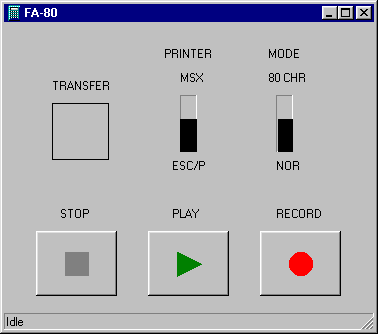
The communication utility invoked with the F4 key resembles the FA-80 slide switches and cassette recorder keys.
Cassette tape recorder
Files are transferred using the data format specified in the mass storage and printer interface for the FX-700P calculator project. Button functions:
- [Play]
- selects the file to be sent to the calculator
- [Record]
- selects the file to which the data received from the calculator is saved
- [Stop]
- closes the file
Printer
The printed text is saved to the file selected with the [Record] button.
Disassembly box
- On entry, the starting address matches the Program Counter, but it can be modified by clicking on the address in the first line.
New value must be confirmed with Enter.
- After clicking on a disassembled instruction, a new instruction can be typed.
As with the starting address, pressing Enter accepts the changes.
Only changes in the RAM area will be saved upon program termination, all ROM modifications will be lost.
Characteristics:
- labels and expressions aren't supported
- accepted are hexadecimal (with the prefix &H) and decimal numbers
Hex Editor box
- The HEX box allows viewing/changing the RAM contents only.
- It is possible to modify the starting address and the RAM contents by clicking on them.
Enter accepts the changes.
Registers box
- The contents of the registers can be modified by clicking on them.
Enter accepts the changes.
- The top area in the register box shows the state of the upper six bits of the Flag register.
They can be modified as well.
Main register file box
- The contents of the registers can be modified by clicking on them.
Enter accepts the changes.
Program execution control
- Closing the debugger windows resumes the program execution without tracing.
- Pressing the button [Run] in the Single step group box executes a single machine code instruction.
- To execute a specified number of machine code instructions type the required value to the field in the Number of steps group box, then press the associated [Run] button.
- The Breakpoint group box allows to specify condition that determine when the program execution should be interrupted.
Currently it only compares the Breakpoint Address typed in the field with the Program Counter.
When they match, the program execution is stopped and the debugger window reappears.
Some parameters of the emulator can be customised by editing the fx8000g.ini file with any text editor.
Description of the contents of this file:
OscFreq=910- This setting specifies the emulated CPU clock frequency in kHz.
SelfTest=0- The value specifies the time (in units of approx. 30-60 ms) for which the TEST pads on the PCB are shorted after starting the application.
Value 0 should be used for normal operation.
Value 20 is recommended for performing the self-test diagnostic routine.
To uninstall the emulator, simply delete the directory where it was installed.
The program doesn't modify anything outside its installation directory.
- The program includes a freeware component ThreadedTimer developed by Carlos Barbosa.
- The ROM image
rom0.bin had to be patched:
1. instructions at locations &H02C6 and &H02C7 have been swapped due to some unsupported keyboard port property
2. unknown instructions at locations &H1482 to &H1485 have been replaced with equivalent known ones
- The quirks of the instructions RODM, SWPM, XCHSM, XCLSM (subtractions of the Carry bit) aren't emulated.
- The scrolling function of the LCD controller command $8 isn't supported.
- Bugs may still lurk in the
rom0.bin memory image.
